ARC Raiders Guide · 10 min read · 2026-10-07
The Ultimate ARC Raiders Cheats Guide: Safe Hacking Tips
A practical guide to ARC Raiders visual, aim, and loot settings, plus the compatibility checks that matter after game and anti-cheat updates.
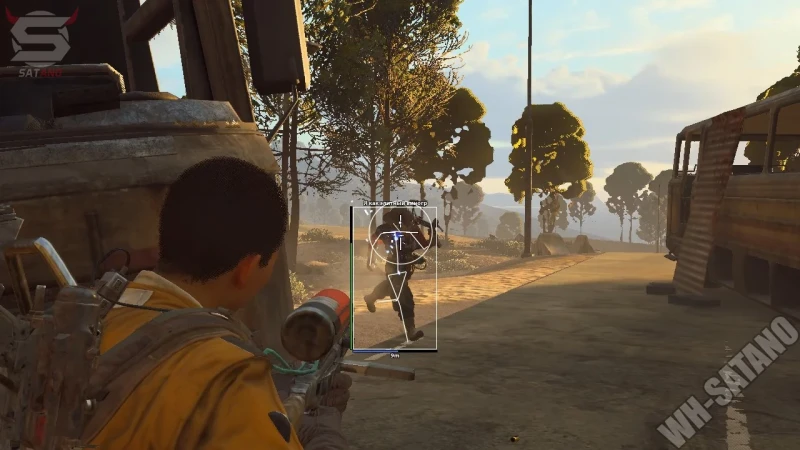
What an ARC Raiders setup should solve
ARC Raiders cheats combine visual information, aim controls, and loot filters in one Windows PC setup. The useful approach is to solve one Topside problem at a time instead of enabling every option.
ARC Raiders is a multiplayer extraction adventure. Official game information describes runs where Raiders search the surface for loot, face ARC machines and other players, and return to Speranza through an extraction point.
A clear ARC Raiders ESP layout can support route decisions, while an ARC Raiders aimbot profile changes how targets are selected. Neither feature is useful when its settings hide the game view or conflict with the current build.
Build a clean visual layer first
Start with a box, distance label, and health bar for players. Add skeleton lines, weapon details, shield bars, or head circles only when each item helps a specific decision.
World visuals should use separate filters for ARC units, ARC threat level, corpses, containers, and loot. A rarity and type filter is more useful than displaying every item in range.
Keep player information readable
Use distinct colors for hostile players, ARC units, loot, and corpses. Keep text short and set a range that matches the current map area.
Dense indoor routes need fewer labels than open ground. If several names overlap, shorten the range before removing the information you use most.
Filter world objects by purpose
A loot run may need rarity, item type, and container labels. A combat-focused run may need only nearby ARC threat levels and player distance.
Save a small number of layouts instead of changing every filter before each deployment.
Tune aim controls in a fixed order
Set the activation key first, then choose field of view and decide whether to draw the FOV circle. Change one value per test so the result is easy to compare.
A tighter FOV keeps selection close to the crosshair. A wider value includes more possible targets and can switch between nearby players or machines.
Test with the same game sensitivity and weapon class. Changing both the game and menu settings at once makes the result hard to measure.
Plan around the extraction loop
Official ARC Raiders guidance says standard extraction points attract ARC and other Raiders. It also explains that available exits can decrease as a session continues, so route information matters most when it leads to an early decision.
Use player distance, ARC threat level, and selected loot markers to choose whether to hold, rotate, collect, or leave. More screen information does not replace a route plan.
For a focused view of positioning information, read the ARC Raiders radar guide.
Check the current anti-cheat stack
Older support pages reference Easy Anti-Cheat, but official 2026 updates say Denuvo Anti-Cheat is now enforced for all players. Embark also names Anybrain, hardware and software detection, and in-house machine-learning systems as parts of the wider stack.
That means an old EAC-only status is not enough. Check the current game build, Windows support, product status, and update time before loading.
The ARC Raiders anti-cheat guide explains why no configuration can promise protection from every current or future detection layer.
Compare features and support before buying
A useful listing names exact controls such as FOV, draw FOV, boxes, skeletons, health, shields, ARC icons, threat levels, and loot filters. It should also state the supported platform, license length, delivery method, and support route.
Use the current status and exact feature list when comparing arc raiders cheats. Monthly and lifetime plans only have clear value when update access and support terms are stated.
Treat every compatibility label as a dated technical result. Game and security updates can change behavior after the article is published.
Ready for arc raiders cheats?
Check live EAC status, then buy aimbot, ESP, and Cloud DMA for Arc Raiders on buyarcraiderscheats.net. Need help? Read support or player reviews. Own the game via the official site.
Community replies
Discussion prompts based on common player questions.
RustBeltRook
Route planner · Oct 7, 2026
Separating player visuals from loot filters helped me most. I can keep combat information visible without covering every room in item labels.
BlueGateRun
Oct 7, 2026
Would you use a different marker range for night conditions, or keep the same profile and only change colors?
SpareBattery
Oct 8, 2026
The fixed order for aim settings is useful. Changing FOV and sensitivity together made it impossible to see which setting caused target switching.
QuietHatch
Solo Raider · Oct 8, 2026
A short list of high-rarity loot is easier to read than every nearby object. I would keep containers in a separate toggle too.
SperanzaTech
Oct 9, 2026
Good update on the anti-cheat stack. A status page that only mentions EAC is missing the newer official changes.
Frequently asked questions
Which ARC Raiders settings should I configure first?
Start with a simple player box, distance, and one world-object group. Add aim controls only after the visual layer is readable.
How do I reduce ESP clutter?
Shorten marker range and filter loot by rarity and type. Disable labels that do not change your next decision.
What does aim FOV change?
It defines the target area around the crosshair. A tighter FOV limits possible targets, while a wider one can include more players or ARC units.
Does ARC Raiders still use only EAC?
No. Official 2026 updates say Denuvo Anti-Cheat is enforced for all players, with Anybrain and in-house detection also in the stack.
Can any setup guarantee account safety?
No. Compatibility reports describe a tested build at a point in time, and future game or anti-cheat updates can change detection.