Aimbot Guide · 9 min read · 2026-10-07
Perfect Your Accuracy with the Best ARC Raiders Aimbot Settings
Configure ARC Raiders aimbot activation, FOV, and draw-FOV controls in a clear order for predictable target selection.
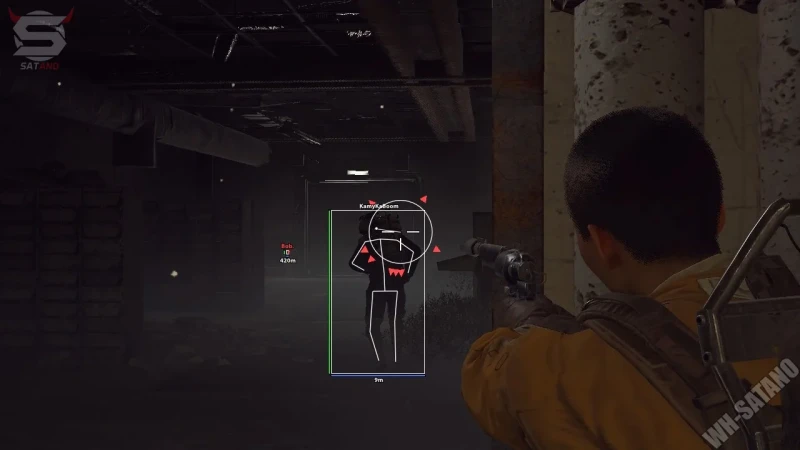
What the best ARC Raiders aimbot settings control
ARC Raiders aimbot settings determine when target selection is active and how wide its selection area is. The available controls are Enable Aimbot, FOV, and Draw FOV, so each one should be tested separately.
The goal is a predictable profile that matches how you already move the crosshair. A very wide selection area can include several Raiders or ARC machines and make the chosen target harder to anticipate.
Keep the game sensitivity, weapon class, and test distance consistent. If those variables change during setup, the same FOV value may feel different for reasons outside the menu.
Start with Enable Aimbot
Confirm the enable control changes state only when intended. Test it before adjusting FOV so activation problems are not mistaken for selection problems.
Use the same input sequence for each test. A repeatable start makes it easier to compare whether the profile behaves consistently across several encounters.
Set FOV around normal crosshair placement
FOV defines the target area around the crosshair. A tighter value limits selection to targets near your current aim, while a wider value includes more of the screen.
Begin with a narrow area and increase it in small steps. Test with one target, then with several targets at different angles to see when selection changes.
Use tighter FOV for focused routes
Indoor paths and narrow doorways often place likely targets close to the crosshair. A smaller selection area can keep unrelated movement outside the target pool.
Review FOV on open ground
Open areas can place movement farther from the center of the screen. Increase FOV only enough to cover the angles you can realistically check and engage.
Use Draw FOV while testing
Draw FOV shows the selection boundary on screen. It makes it easier to see why a target enters or leaves the available area.
Keep the circle visible during setup, then decide whether it helps during a normal run. If it covers important prompts or visual markers, disable it after the profile is clear.
For a cleaner target view, pair the settings with the filtered player options in the ARC Raiders ESP guide.
Test profiles by encounter range
Build a close-range and open-area profile only if the same value does not fit both situations. A small number of named profiles is easier to manage than many nearly identical settings.
Run several tests before judging a change. One target path can make a wide or narrow FOV look better than it performs in a mixed encounter.
The ARC Raiders radar guide explains how direction and distance information can support crosshair placement before activation.
Check current support before loading
A working setting does not prove permanent compatibility. Official 2026 information describes Denuvo Anti-Cheat, Anybrain, hardware and software detection, and in-house detection as parts of the wider stack.
Check the game build, Windows support, product version, and test time when reviewing arc raiders cheats. Recheck after meaningful game or security updates.
For the current security overview, read the ARC Raiders anti-cheat guide.
Ready for arc raiders cheats?
Check live EAC status, then buy aimbot, ESP, and Cloud DMA for Arc Raiders on buyarcraiderscheats.net. Need help? Read support or player reviews. Own the game via the official site.
Community replies
Discussion prompts based on common player questions.
TightCircle
Settings tester · Oct 7, 2026
Starting narrow made the biggest difference for me. A wide circle was including movement I had not placed near the crosshair.
DrawLine
Oct 7, 2026
Do you keep Draw FOV visible after testing, or hide it once the boundary feels familiar?
DamAngle
Oct 8, 2026
One indoor profile and one open-area profile sounds easier than adjusting the same value every run.
SameSensitivity
Oct 8, 2026
Keeping game sensitivity unchanged is important. I changed both and could not tell why the selection suddenly felt wider.
CenterFirst
Oct 9, 2026
Testing several targets at different angles shows more than a single stationary target. It exposes target switching quickly.
Frequently asked questions
Which ARC Raiders aimbot setting should I test first?
Test the enable control first. Confirm activation is consistent before changing the selection area.
What does aimbot FOV control?
It defines the target-selection area around the crosshair. A smaller value limits possible targets, while a larger value includes more of the screen.
What does Draw FOV do?
It displays the selection boundary. Use it during setup to see when targets enter or leave the available area.
Should indoor and outdoor routes use the same FOV?
They can, but the same value may not fit every encounter range. Keep only a few profiles if separate settings are needed.
Can an aimbot setting guarantee account safety?
No. Compatibility can change after game or anti-cheat updates, so check the current supported build and test time.